The short version
Start with your schedule, choose a few realistic meals, check your pantry and prepare your shopping list. When dinner changes, review the list too.
Plan meals around your actual week and turn them into a useful shopping list. Swap a dinner, compare ingredients and explore Vesta’s weekly plan.
Change dinner. Watch the list.
Tuesday’s plans change. Try the alternative, then tick what you already have.
01 / THREE EXAMPLE DINNERS
Main ingredients and illustrative quantities, excluding seasonings. This is not a nutritional plan.
02 / WHAT IS MISSING?
6 ingredients to check
Tomatoes appear in two dinners: the list shows their combined 300 g.
Here totals change immediately to explain the method. In the app, review or regenerate the shopping list after a swap.
Illustrative demo, not the app. No account; reloading resets your choices.
Start with your calendar, then the menu
A weekly meal plan does not need a different recipe in every slot. It helps you make some decisions before the end of a busy day. Start with three things: when you will eat at home, how much time you have to cook and what is already in your kitchen.
Choose two or three dinners, leave a flexible slot and note meals out. This is an organising method, not a diet or a portion prescription. If you follow professional guidance, keep that as your reference.
- A free evening: a recipe you want to cook.
- A busy evening: something simple using ingredients you already have.
- An uncertain plan: a choice to confirm before buying everything for it.
Turn a menu into a list you can use
A useful shopping list answers a practical question: what is missing for the meals you chose? Write down the ingredients, combine repeated items, then check your fridge and pantry before buying.
In the demo, tomatoes appear in two dinners. See how their quantities add up. These amounts only illustrate the method: they are not a complete daily menu or nutritional targets. In Vesta, you can generate a shopping list from the plan and review it before using it.
- Keep different preparations separate: cooked weight is not raw weight.
- Check quantities, pack sizes and ingredients you already have.
- Review the list when meals change so you do not buy things you will not use.
- 01Look at your weekMark busy evenings and meals out.
- 02Choose your mealsFood you enjoy, with realistic prep time.
- 03Check your pantrySeparate what you have from what you need.
- 04Review the listMatch your shopping to the plan you will use.
Dinner changes. Your week carries on
An invitation, a missing ingredient or a late finish can change dinner. Make the consequence visible: if a recipe disappears, do you still need all its ingredients? If another takes its place, what is missing?
In Vesta, open a planned meal to choose an alternative. After changing meals, review or regenerate your shopping list: a previously saved list may no longer match the current plan. The experiment on this page updates totals immediately to explain the connection; it does not reproduce the app interface.
The plan is a starting point. The diary tells the rest
What you planned and what you ate are different pieces of information. Confirm a planned meal in Vesta to add it to your diary. If dinner was different, log what happened instead of making your day fit the plan.
Vesta brings meals, preparation and shopping into a weekly view, while Today makes your day readable. The screenshots and recorded demos here show that connection using illustrative data. Your next step can be small: choose tomorrow’s dinner and check what is missing.
NOW, INSIDE VESTA
Your week takes shape.
Meals, workouts, preparation and shopping. One place to see your week and choose where to start.
Actual app screenshot with illustrative data.
Lunch was different? Tell your diary.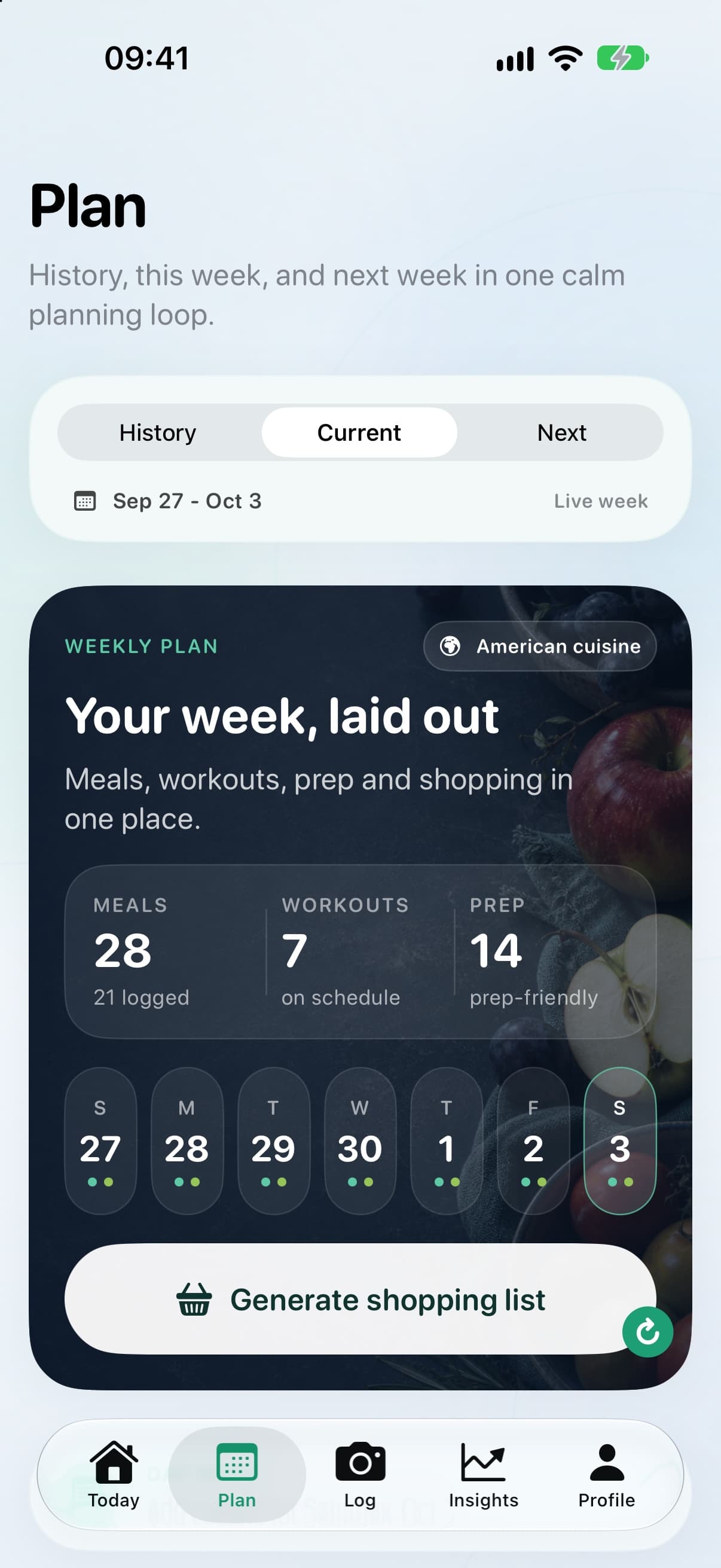
See it happen.
Recorded app demos. Press play when you are ready.
Goals, tastes, movement and a weekly plan: take a look inside Vesta. App recordings with a demo profile and plan.
Video in Italian, with English captions.
Confirm a planned meal and see it in your daily diary. Meal-logging demo with illustrative data.
Video in Italian, with English captions.
05 / FAQ
Frequently asked questions
Can I use this example as a weekly diet?
No. It shows three dinners and their ingredients without assessing nutritional needs, allergies or completeness. A therapeutic or individual dietary plan requires a qualified professional.
Does Vesta generate a shopping list?
Yes. From Plan you can generate a list for an available period and review it. After changing meals, check that your list matches the updated plan.
Do I have to follow the plan exactly?
You can change meals and log what you actually ate. Planning helps with daily decisions while leaving room for real life.
Does the demo save my choices?
No. It uses a fixed example in your browser with no account. Reloading resets your choices; they are not submitted as food data.
Sources and method
Primary sources used for this guide. Drafted with AI assistance and checked against the cited sources; consult the originals before important decisions.
This article provides general wellness information. It does not replace personalized medical, nutrition or professional guidance.